
Run the workflow#
This page assumes you have already successfully installed a working environment.
Run with pixi tasks#
The easiest way to run the data retrieval and processing, and PyPSA network building and solving steps is to use our pre-prepared pixi tasks.
These are shorthand calls of the form pixi run <task-name> which we have pre-programmed to run a longer snakemake call.
To trigger the full workflow and generate redispatch results for all configured FES scenarios and future years, use the following command in your terminal:
pixi run model
To trigger the workflow up to, but not including, the solve steps (usually the most computationally burdensome stage), use the following command in your terminal:
pixi run compose_networks
You can add additional options to these calls as necessary.
For instance, to run using multiple simultaneous threads, you can add the snakemake cores option:
pixi run model --cores 4
Or, to “dry” run the workflow, to see a list of all jobs that will be executed without actually running anything, you can add the snakemake dry-run option:
pixi run model --dry-run
For more details on the snakemake options available, refer to the snakemake CLI documentation.
Run with snakemake calls#
The generation of the model is controlled by the open-source workflow management system Snakemake.
The Snakefile and all .smk files in the rules directory declare a rule for each script in the scripts directory.
These rules describe which files the scripts consume and produce (their corresponding input and output files).
snakemake then runs the scripts in the correct order according to the rules’ input and output dependencies.
snakemake will also track what parts of the workflow have to be regenerated when files, scripts, or configuration options are modified.
We can call snakemake directly with pixi by prepending our calls with pixi run -e gb-model, which tells pixi to run a command using our GB dispatch model dependencies.
For example, an invocation to
$ pixi run -e gb-model snakemake resources/GB/gb-model/HT/ev_demand/2040.csv
follows this dependency graph
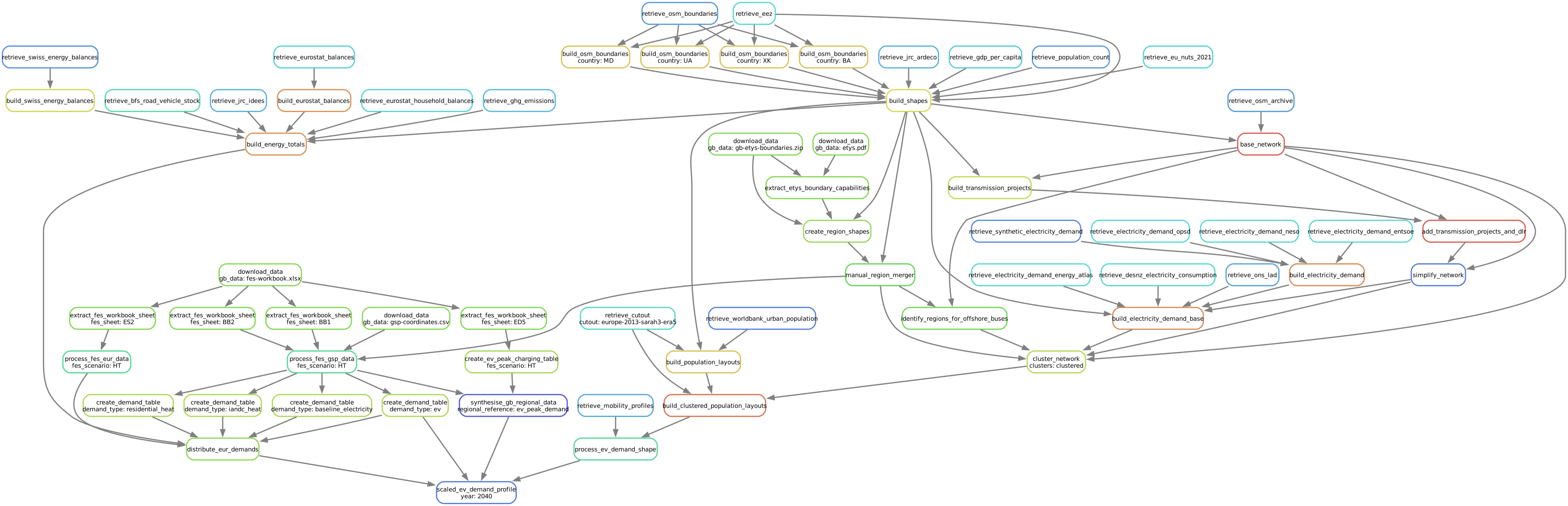
to create a timeseries profile for EV demand per model region for the year 2040 and the “Holistic Transition” FES scenario.
The blocks represent the individual rules which are required to create the file referenced in the command above. The arrows indicate the outputs from preceding rules which another rule takes as input data.
Note
The dependency graph was generated using
pixi run -e gb-model snakemake --dag -F resources/GB/gb-model/HT/ev_demand/2040.csv | sed -n "/digraph/,/}/p" | dot -Tsvg -o doc/gb-model/img/gb-intro-workflow.svg
It is unlikely that you will know exactly what files are available for you to call directly when you first start running a workflow, but you can get a better idea of what is available once you have run the workflow through once and inspected the files in the resources and results directories.
See also
snakemake basic tutorial: to familiarise yourself with
snakemake.snakemake command line interface: to familiarise yourself with the available arguments when running directly with
snakemakeor viapixi runcommands, noting the arguments-j,-c,-f,-F,-n,-r,--dagand-tin particular.